Flagship · AI/ML · Completed
TrendCascade
Takes up to 5 keywords and turns Google Trends, Shopping, and Ads data into locality-level search-volume estimates and an AI-generated ad/inventory strategy report.
- Timeline
- 2026-04 – Present
- Status
- Completed
- keywords per test run
- 4
- end-to-end run time
- ~2 min
- est. manual research time for equivalent output
- ~3 hrs (estimated)
Stack
Built with
Core
Supporting
The problem
Google Trends only gives a 0-100 relative interest score, not absolute search volume, and that scale isn't comparable across keywords or geographies — so a brand can't directly answer 'how many people in my delivery radius are actually searching for X, and in which neighborhood.' I built this for a Delhi/Ghaziabad ethnic-wear brand that needed an actual go/no-go signal per category and locality for ad spend, not just a relative interest chart.
Constraints
- SerpAPI's Google Trends TIMESERIES comparable-call endpoint caps at 5 keywords per call, so keyword input is validated and rejected above 5
- Google Trends returns only relative 0-100 interest, never absolute search volume — had to derive real numbers by cascading Google Ads' national keyword-volume estimate down through regional interest ratios
- Built and iterated solo (this is v5 of the workflow) — daily/intraday granularity and the volume cascade were added after the base monthly pipeline was already working
Architecture
How it's built
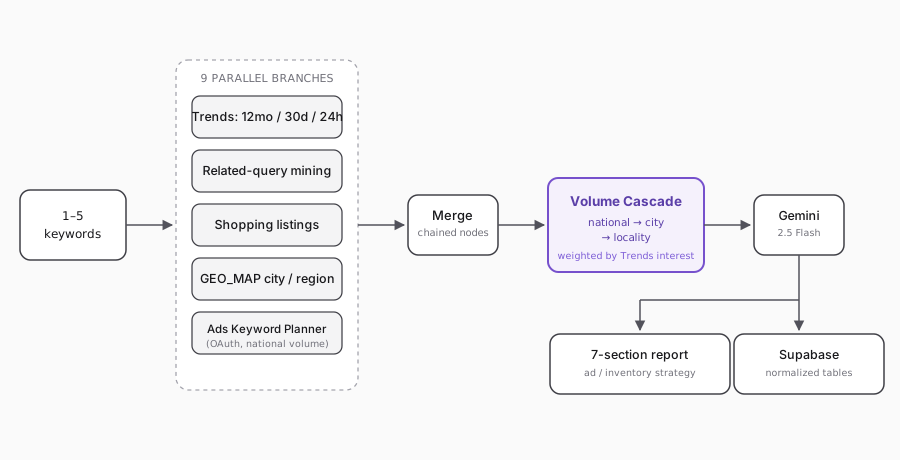
A form trigger takes a comma-separated keyword list (validated to 1-5, deduped, lowercased) and fans it out to nine parallel branches in n8n: 12-month, 30-day, and 24-hour Google Trends timeseries; related-query mining with locality-name detection; Google Shopping listings for price bands and top sellers; a 'location-in-query' trick (keyword + 5 named Delhi localities) to rank hyperlocal demand; Google Trends GEO_MAP at both city and region granularity to compare NCR cities; and a Google Ads Keyword Planner call (OAuth refresh-token flow) for national monthly search volume. A Volume Cascade step then takes that one national number and distributes it down to Delhi, to each NCR city, and to each named locality, weighted by each geography's relative Trends interest score (falling back to fixed population weights when a geography has no Trends signal at all). Every branch folds through chained Merge nodes into one JSON payload that becomes a single Gemini 2.5 Flash prompt, producing a 7-section strategy report. The run and every intermediate result (trends, shopping, area demand, city demand, volume cascade, the final report) get written to Supabase as normalized rows, not one JSON blob.
Decisions
Alternatives considered
Buy a dedicated keyword-volume API for city/locality-level numbers directly
Locality-level search-volume data isn't a purchasable product for Indian neighborhoods; cascading Google Ads' national volume through Trends' relative interest ratios was the only way to get a locality number at all, even an approximate one.
Decisions
Tradeoffs
- Chose modeled locality/city search-volume estimates (national Ads volume × relative Trends interest ratio) over no numbers at all — the aggregate is grounded in Google's real Ads volume, but any single locality's or single day's estimate is inferred, not measured.
- Kept every intermediate result in its own normalized Supabase table instead of one denormalized JSON blob — more pipeline wiring (a Prep + Insert node pair per table) but each signal stays independently queryable later.
Honesty check
What failed
- SerpAPI calls run with onError: continueRegularOutput so one keyword's rate-limit or bad-query failure doesn't kill the whole batch — but that meant a failed call's echoed search_parameters.q came back empty, and every downstream Code node was silently keying results on keyword: '' instead of erroring loudly. Every extraction node now pulls the keyword from the original trigger data via itemMatching(idx) instead of trusting SerpAPI's echo — a fix I ended up applying in five separate places once I found the first one.
Lessons
- Never trust a third-party API's echo of your own input as a join key, especially once you're tolerating partial failures — pull identifiers from your own source of truth, not from what the API hands back.
- Relative interest (Trends' 0-100) and absolute volume (Ads' monthly searches) are different units; you can't compare or rank across keywords on the 0-100 number alone, only within one keyword's own history.
Future improvements
- Swap the manual Form Trigger for a webhook so this runs on a schedule instead of someone submitting keywords by hand — the Keywords node already reads from a generic keywords field for exactly this reason.
- Generalize past the 5 hardcoded Delhi localities so the location-in-query trick works for any city, not just Delhi NCR.